iGoogle will be retired on November 1, 2013. The mobile version was retired on July 31, 2012.
How did you come to this decision? We originally launched iGoogle in 2005 before anyone could fully imagine the ways that today's web and mobile apps would put personalized, real-time information at your fingertips. With modern apps that run on platforms like Chrome and Android, the need for something like iGoogle has eroded over time, so we’ll be winding down iGoogle on November 1, 2013.
Can I save my iGoogle homepage settings? Yes, you can export your iGoogle homepage settings (including country, language, theme, layout and gadgets installed) to an XML file.
To export your settings:
Click the Options gear then iGoogle settings.
At the bottom of the page, click Export next to "Export iGoogle settings to your computer."
What will happen to the data stored in my gadgets? All of your personal data stored in other Google products will continue to be available via those products, including Gmail,Google Calendar, Google Finance, Google Drive, Google Bookmarks, and Google Tasks. This means you'll still be able to access your emails, documents and events. Instead of accessing your data through the gadget, you'll need to visit the product directly.
Some gadgets, such as the to-do list, allow you to download your data to a file. To download from your to-do list, click the Download all option under the My List drop-down menu next to the title of your list.
Most iGoogle gadgets are created and maintained by third-party developers. If you’d like to export your data, you should contact the gadget creator directly.
I really like iGoogle -- are there any other alternatives?
Google announced that the customizable homepage iGoogle would be shut down a long time ago. The shutdown has been more than a year in the making, but there are now less than three weeks until the inevitable demise.
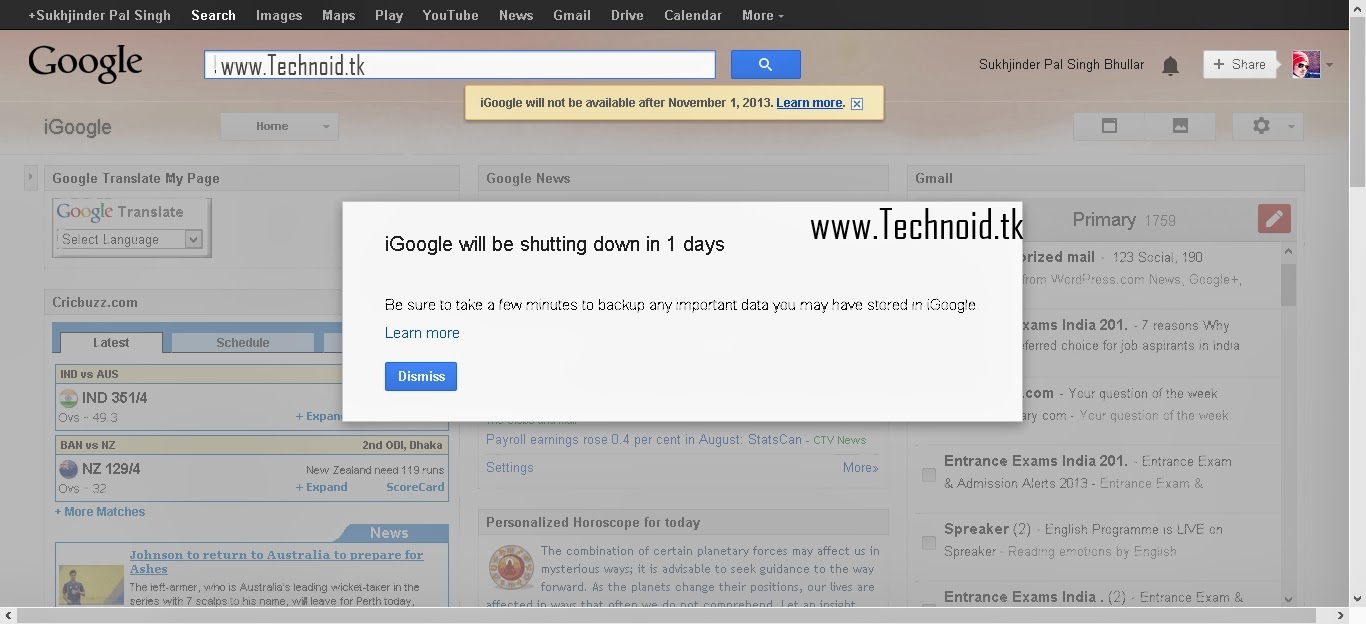
Anyone still using iGoogle is now greeted with a very hard to ignore message warning them that the service is going down on November 1.
The warning message directs users to Google's help page about the shutdown. The page explains why the feature is going away, it's not very hard to guess, not a lot of people used it. It also explains how to export your data if you plan to switch to one of the few alternatives out there.
"We originally launched iGoogle in 2005 before anyone could fully imagine the ways that today's web and mobile apps would put personalized, real-time information at your fingertips. With modern apps that run on platforms like Chrome and Android, the need for something like iGoogle has eroded over time, so we’ll be winding down iGoogle
This blog post is the first part of a series of posts, which describe how VoIP works and how the Sipwise sip:provider Platform enables you to start various VoIP business models.
Part 1, which is provided in this post, gives you an introduction in how VoIP works.
Part 2 shows how you can set up a secure and self-hosted Skype-like VoIP system for free using the sip:provider Platform within 30 minutes.
Part 3 is dedicated to the sip:provider Platform acting as an SBC in front of existing VoIP systems.
Part 4 describes how you can operate a whole-sale business with the sip:provider Platform.
Part 5 shows how to enable Over-The-Top (OTT) services using Apple and Google Push Notification Services.
Introduction
VoIP Systems are seen as complex communication infrastructures even from a high level perspective, but they’re not. Well, VoIP is in fact complex in its details, but it has been abstracted by various projects in order to make it really straight-forward to use it, so it’s easy to start a compelling voice/video communication system or service (which I’ll name “VoIP system” or “VoIP service” throughout the document) from scratch, but it’s important to learn a few facts about it in order to choose the right base system for successfully running a VoIP service.
The Basics
VoIP just means “Voice over IP”, which is a generic term for transporting real-time voice sessions over the Internet. However, it doesn’t define HOW this is done, and even the term “Voice” is a bit misleading, because with the very same concept, you can transport also Video and Fax over an IP connection.
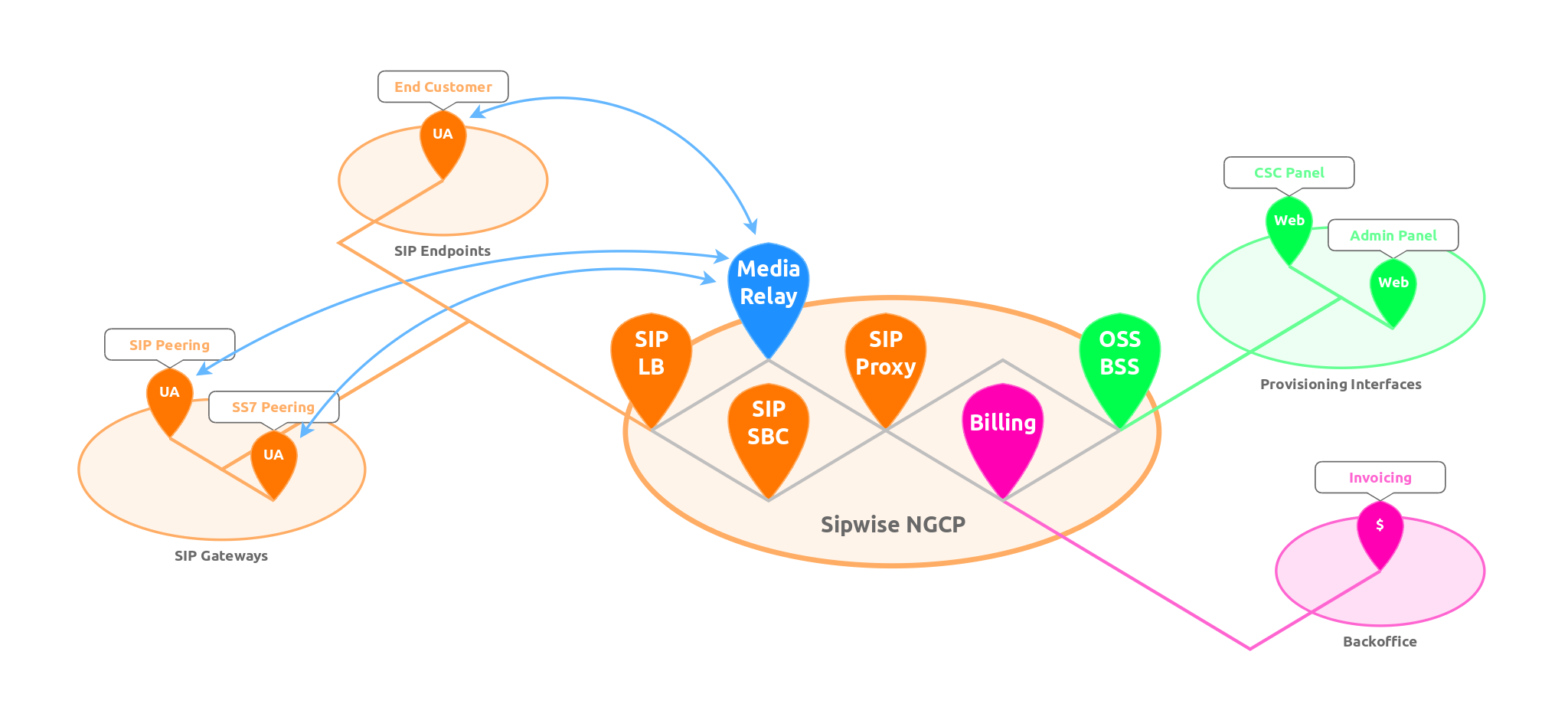
There are a couple of elements involved when you’re talking about a VoIP system:
To sum it up, there are SIP Endpoints, which are the client instances of your customers. These could be software installed on your customer’s computers (popular software is Jitsi, an open source and cross-platform communications client, or Bria, a commercial multi-platform client for Windows, iOS and Android). Other possibilities are SIP phones like SNOM phones or Polycom Phones.
Beside the customer facing end points, there are SIP gateways which translate VoIP into traditional fixed-net and mobile networks. They pretty much act like customer facing clients, but usually are able to handle multiples of parallel calls. They are usually connected via multiple ISDN E1 or T1 lines, and sometimes an SS7 control layer is used on top.
How does SIP work?
In order to establish a communication session, you need a signaling protocol, which tells the involved parties who wants to communicate with whom, and which media capabilities might be used (e.g. plain voice, voice/video, fax etc.). There are several protocols out there, like Skype (a proprietary protocol) and H.323 (more or less obsolete since 2004) and the most important and nowadays most wide-spread one and the one we’re concentrating here: SIP, the Session Initiation Protocol.
SIP Registrations
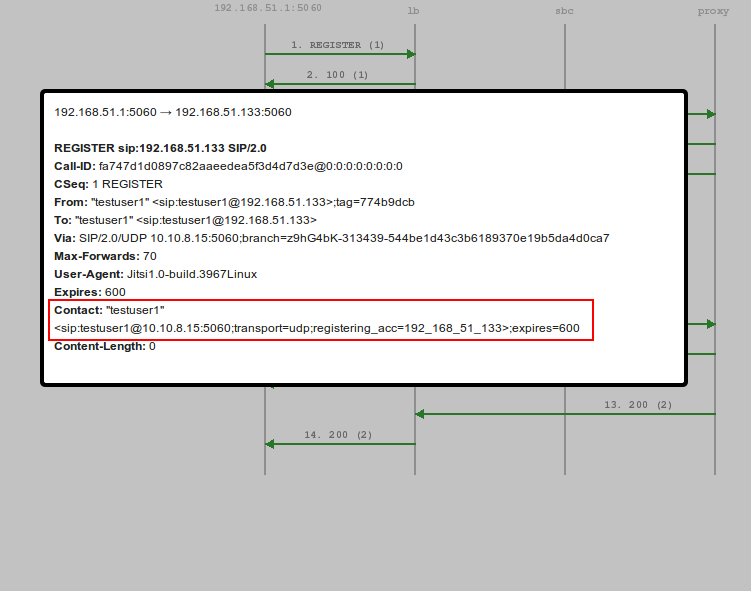
A very important part of VoIP is the registration of customer endpoints. It means if a customer starts its SIP client, the client tells the SIP server at which IP and port it is reachable in case there’s a call towards this customer. The call flow looks like this:
The important part, beside the authentication scenario which is a http digest authentication, is theContact header, which indicates at which IP:port the customer is reachable.
So during start-up, the client tells the server the contact address it’s reachable for subsequent calls.
But what about real Phone Numbers?
Ok, so we learned that alice@example.com can contact bob@example.com if bob@example.com registered up-front (telling the SIP service provider at which IP:port he’s reachable), and vice versa. But what about real phone numbers?
In order to receive calls from the PSTN (public switched telephony network), your SIP service provider needs to map a PSTN number to your SIP URI, e.g. he needs to know that alice@example.com is an equivalent to for example +43 1 1001. If somebody calls 4311001 in the PSTN, it’s routed through the telephony network down to your service provider, which holds ownership of that number. The service provider is now responsible to translate the number to a corresponding SIP-URI, and then route the call to the IP:port where this user is registered.
How about a Video Stream?
The important thing here is that any media stream in SIP signalling is negotiated end-to-end. This means that if alice@example.com calls bob@example.com, alice proposes a list of media sessions (e.g. audio with a specific list of codecs, and video with a specific list of other codecs), and bob compares this list with its own capabilities and then replies with a (potential) sub-set of the offer from alice. So if alice proposes an audio and video call, but bob doesn’t have a web-cam, he’ll reply with a sub-set of alice’s offer, which only contains the audio-part. However, if bob has a web-cam, we’ll reply with an according answer telling alice that both audio and video streams are available.
Conclusion
If you want to work with “VoIP”, you most likely will work with the SIP Protocol. SIP will allow you to do two-way, end-to-end communication, but you’ll need SIP clients to attach to a system like this. Do you need do pay for an external service in order to start a VoIP system? No!
What’s next?
The next post will describe how you can use the open source Sipwise sip:provider CE to build a VoIP system from scratch within an hour. It’ll show how you can create a Skype-like service within your network using IPv4, IPv6, TLS and SRTP.
Follow us at Twitter and Facebook for updates and new posts.
Having long expected version 5.0 of Android to be given the code name Key Lime Pie, Google instead handed the 'K' release name to Android 4.4 and in a weird cross-promotional deal it called it Android KitKat.
As part of the deal Nestle is running a contest to win aNexus 7 or Google Play credit through specially branded Kit Kat bars.
So, apart from the fact that the chocolate bar has a space between Kit and Kat and Android 4.4 doesn't. what do we know about KitKat so far?
Android 4.4 release date
Android 4.3 recently arrived on the Nexus 7, Nexus 7 2012, Nexus 4, Nexus 10 and Samsung Galaxy Nexus but is yet to roll out to other devices. It'll also be arriving 'soon' on the HTC One and Samsung Galaxy S4 Google versions, with HTC saying it expects to push it out to developers by the end of September.
So now we can start to look forward to the Android 4.4 KitKat release date. But when? We'll take a guess at late October or early November 2013 for now - which is when we were previously expecting to see Android 5.0 break cover.
Cut to the chase What is it? A minor upgrade for Android, to follow on from Android 4.3 Jelly Bean When is it out? The rumors say October 18, 28 or 31 What will it cost? Nothing, it'll be a free upgrade
On September 20 Nestle Germany confirmed an October launch for Android KitKat on its German KitKat Facebook wall, replying to a question with a translated message which reads: "Hi Tim, Android 4.4 KIT KAT is available in October".
A release date earlier tipped to Ausdroid which turned out to be incorrect was October 14, as was October 15 which was a date supposedlyoverheard at Google's October Launchpad developer event.
Writing on his Google+ page on 3 October, Artem Russakovskii of Android Police said that the Android 4.4 release date is actually October 31, a date that was set some time in early September.
"Dates do change, and my information is about a month old, so if KitKat or the Nexus are delayed, Google may not hit the October 31 date," wrote Russakovskii. "I really don't see them finishing everything early, so I wouldn't bet on anything earlier than that date."
Russakovskii added that this date fits with a rumoured October 14 TA (Technical Acceptance) date for the next Nexus, which had been earlier misinterpreted by the media as the release date.
Update: Google seems to be playing a bit of a game with us now after posting a couple of teasing statues on its official Google+ KitKat page which the world has taken to be a series of cryptic clues. Are they right? We'll let you decide.
Our video below rounds up what we know so far.
Android 4.4 features
Android 4.3 came with a few minor upgrades including better multi-user customisation, support for Bluetooth smart technology and an updated keyboard. As a minor release, Android 4.3 didn't even get its own desert-themed name, sharing the Jelly Bean moniker with Android 4.1 and 4.2.
So with a brand new code name, we can expect Android 4.4 to bring some bigger changes, but all Google is saying at this stage is: "It's our goal with Android KitKat to make an amazing Android experience available for everybody."
From this, we can assume that Google wants to get Android onto less powerful devices, something we were previously hearing about Android 5.0 when it was claimed that the new OS would be optimised to run on devices with as little as 512MB of RAM.
We also learned from Android Central back in February 2013 that Google is working with the Linux 3.8 kernel. One improvement that this kernel brings is lowered RAM usage, which fits with Google's goal of bringing Android to more devices.
The source who tipped Ausdroid with the October 14 release date also leaked some supposed details of the new OS, confirming that it would be available for "older phones", adding that it would also bring gallery visualization tweaks, new animation APIs, new notification widgets and the ability to change the Android default blue to other colors.
Leaked screenshots sent to 9to5Google, as well as other sites, show what might be a sneak peak at the Android 4.4 phone and messaging apps. The screenshots show a cleaner design and a lighter colour, plus a status bar that changes colour according to the colour scheme selected.
Are these KitKat's phone and messaging apps? [Image credit: 9to5Google]
However, Android Police appears to have received the same screenshots, and having taken a close look at them, it reckons that they're actually either full-screen mockups or a custom ROM.
An image that Android Police is more positive about is one of a Korean keyboard that was posted to Google Play. In a small change, that shot shows that the status bar icons have changed from blue to gray. Thoseimages on Google Play have since been replaced with Jelly Bean screenshots.
A screenshot unearthed by Myce suggests that Android 4.4 may indeed come with themes as the icons in the notification area for the image that the site found on the Chromium bug tracker (shown below) are blue. Myce adds: "we found references to theming in the log file but are unsure if it will really become a feature." Android Community reckons the screenshot was taken on a Nexus 4 running KitKat.
Does the change in icon colors signal Android themes ahead?
Another set of snaps claiming to show Android 4.4 running on a Nexus 4 reveal that the KitKat update could sport a re-designed settings menu complete with a print function, plus new photo editing tools in the gallery.
How would you like your print? [Image credit: Android Authority]
"In fact, the Messaging app is gone and is fully replaced by Hangouts, at least on the Nexus device that was being tested. It should be able to handle MMS as well," he wrote.
That rumor was upgraded to a likelihood of "9 out of 10," by Android Police on October 8, which also posted some screenshots to support the rumor. Android Police reckons that video sharing will be integrated with Hangouts as well.
SMS in Google Hangouts [Image credit: Android Police]
Talking of Messaging, Google confirmed on its Android Developers Blog that KitKat will enable people to choose their default app for sending and receiving SMS messages. This suggests that the Messaging app may not vanish, and you'll be able to choose Messaging, Hangouts or a third-party app to handle your messages.
Android Police also reckons that location settings will be getting a refresh, with new Location Mode checkboxes enabling you to choose which methods apps on your handset can use to determine your location (GPS, Wi-Fi and mobile, Wi-Fi and mobile only, GPS only). Apparently, you'll also be able to see which apps have recently made a location request.
As the KitKat release date approaches, it seems the leaks keep on coming. On October 11, a series of screenshots of what is supposedly Android 4.4 running on a Nexus 5turned up on Italian site Tutto Android. The shots show a less cluttered, flatter interface, with Google Now being given more prominence.
One of the shots posted on Tutto Android also shows a new option under Settings called 'Tap & Pay', suggesting that Google Wallet may be more integrated into Android 4.4.
We also learned on October 14 that Android 4.4 may bring an 'always listening' feature. A leaked build of KitKat running on a Nexus 5 apparently responded to "OK Google" and "OK Google Now" from the home screen.
Find out what other changes we expect to see in Android 4.4 in the video below.
Shown off in a 38 second advert, the new Nexus handset looks to be equipped with a large camera and a matte black finish, carrying an LG logo on the back.
Google has since taken the video down, leading to further speculation that it did indeed reveal the Nexus 5.
An Android 4.4 powered Nexus 5 supposedly raised its head again on 16 September where it was seen flaunting its stuff in a bar. 9to5Google posted photos and video of what might be the new Nexus, apparently left there plugged in and unsupervised by a Google employee so that an eagle-eyed bar worker was able to snap some photos and shoot a video.
In case you haven’t noticed, Kit Kat has been going a bit crazy on Google+. Yesterday, the company posted a photo of a dancing Android-shaped Kit Kat bar on the day that some (definitely not all) thought Google would announce Kit Kat and the Nexus 5. That didn’t happen, and Kit Kat is still posting as many cryptic messages on Google+ as they can.
This time, it was a picture of Kit Kat bars arranged to spell out “This is it.” And, quite literally, that’s it. Nothing more, nothing less. There was no #Android, no Android mascot, or anything else to help rabid fanatics everywhere figure out what this meant. That said, we were still curious to hear your thoughts, and posed the question to you on Google+. The responses? Nothing short of hilariously ridiculous.
One reader, Richard Colon, was the first to suggest Kit Kat was referring to Michael Jackson’s “This is It,” a 2009 documentary that launched on October 28th. This is where the October 28th train got rolling.
Reading further, the silliness really started when user Liam Muller jokingly suggested the following:
If you also look, it takes 16 wafers to make “THIS IS IT” and today is the 16th of October so today might be the day :)
So now we have the 16th and the 28th, but Ed Carter suggests we’re all thinking about it wrong: Michael Jackson’s “This is It” tour eventually got cancelled, which could mean Android 4.4 Kit Kat or the Nexus 5 got cancelled. I know. Just bear with me.
Richard chimed back in a bit later to remind us that yesterdays “Everybody Dance Now” teaser shares the name of the hit song by 28th Street Crew, which he believes lends more credence to seeing Kit Kat and/or Nexus 5 on the 28th.
Finally, Haaris Edhi decided to drop their 2 cents and let us know that there are “8 letters in “this is it” and 2 sentences, meaning October 28.” We’ve all obviously gone off the deep end here, and perhaps that’s what makes this entire thing genius by Kit Kat and Google.
They know how crazy we get over this stuff. They know that one image alone is enough to send the hype meter through the roof, and they know they have us right where they want us — salivating for Android 4.4 Kit Kat just as much as most chocolate lovers salivate for an actual Kit Kat bar.
The stated goal of the next version of Google’s Android operating system—4.4 “KitKat”—is “to make an amazing Android experience available for everybody.”
What does that mean? It is odd and cryptic … and the only thing we officially know about what Google is going to do with KitKat. If we piece together some of the rumors swirling around what Android 4.4 will entail and combine it with what we know about how Google has been updating Android and its pertinent features over the last year, we get a pretty good idea.
It leads us to a new Android experience. What some people are calling “the Google Experience.”
Waiting For The Big Android Update
Android 4.4 KitKat is expected to be announced by the end of October. The hype cycle is beginning to hit full tilt as stream of leaks and rumors illuminate what Google will unveil the next version of Android and the flagship smartphone that will accompany it, the Nexus 5.
KitKat will be the first new named version of Android in more than a year since Jelly Bean 4.1 was introduced at Google’s I/O developer conference in the spring of 2012. Google has offered up two updates to Android since then—versions 4.2 and 4.3—that have both been rolled up in the Jelly Bean moniker. Now that Google is almost ready to unveil the “K” desert version of Android (Google normally names each new version of the operating system after sweet treats in alphabetical order), users, developers, manufacturers and consumers are expecting a lot.
The last two versions of Jelly Bean haven’t given us a ton to be excited about. The biggest feature in version 4.3 was the integration of Bluetooth Low Energy to the Android hardware specification along with OpenGL for Embedded Systems. These are good updates for app developers out there but leave much to be desired for users that are looking for a fresh coat of paint and improved user experience.
The Google Experience
In that vein, the rumor mill points towards a major feature that will change some of the fundamental usability of Android: the “Google Experience.”
Source: Android Police
The Google Experience Launcher is rumored to be a hub launcher for Google apps and widgets on Android devices. Google Experience will be a form of launcher within Android that will not be tied specifically to version 4.4 KitKat but will rather be an app through the Google Play app store that will be compatible with devices running Android back to version 2.2 Froyo.
A launcher is also known in general terms as a “skin” but the terms are not mutually exclusive. The Google Experience Launcher is rumored by the blog Android Police to be a widget that live on the Android homescreen in which Google features like Search and Google Now are heavily integrated, can read the data within the widget and update itself. A launcher would also control aspects such as app folders and homescreens (which are rumored to be infinite instead of limited to five as they are in current builds of Android).
What would Google Experience mean for Android users? Speculation is that KitKat 4.4 will enable support for lower-end Android devices. Google Experience would likely be the vehicle for that.
If you have been following the evolution of Android as an operating system, you will note that the Google has made some pretty significant changes to how Android works on a smartphone. In the past, Google used to tie almost all of the functionality of its own apps to the Android kernel. That meant developers and consumers would need a certain version of Android to get new features. Wanted the latest update to the Google Play app store (formerly Android Market)? You needed to update your Android software. How about the latest APIs and user interface in Google Maps and Navigation? Update Android. Gmail, Calendar, Talk (now Hangouts) or any other Google service? It was tied to the Android kernel.
Google changed all of that with the release of Android 4.1 Jelly Bean, decoupling its own apps from the Android operating system. Instead of being tied to Android, features and APIs like Maps either stand alone as their own apps that live in the Google Play store and/or are tied to what is called Google Play Services.
Google Experience As A Front-End Extension Of Google Play Services
Google Play Services is what is known in the computing world as a “shim.” Here is the definition of a shim, from Wikipedia:
In computer programming, a shim (from shim) or shiv is a small library that transparently intercepts an API and changes the parameters passed, handles the operation itself, or redirects the operation elsewhere. Shims typically come about when the behavior of an API changes, thereby causing compatibility issues for older applications which still rely on the older functionality. In such cases, the older API can still be supported by a thin compatibility layer on top of the newer code. Web polyfills are a related concept. Shims can also be used for running programs on different software platforms than they were developed for.
In Android, Google Play Services is a stand-alone app that runs in the background. It updates itself with functionality directly from Google without the user doing anything. It downloads its own code and enacts its own functionality. For example, if there is an update to the Google Play Store or Maps, it is downloaded and implemented through Google Play Services.
If the Google Experience is really going to be a primary feature in KitKat 4.4, as the rumors say it will, then what Google is doing is giving Google Play Services a front-end user interface for Android devices.
By extension, the Google Experience can be transported back to older versions of Android. If we look at the definition of a shim in that, “the older API can still be supported by a thin compatibility layer on top of the new code” then it is possible for Google to bring just about all of the Android features and functionality that are not explicitly tied to hardware back to any phone running a previous version of Android.
The news said that another person had their identity stolen. It happened again. You might even know of someone that had it happen to them. We often hear of percentages - and they are surprisingly high. Enforcement is taking place, but we have to wonder if computer hacking laws are really having any effect against cyber hacking. This article will show what is being done against cyber crime. Defining Cyber Crime Hacking has a rather simple definition to it. Basically it is defined as the unauthorized use of a computer - especially when it involves attempting to circumvent the security measures of that computer, or of a network.
Hacking is not difficult to learn. Unfortunately, it may be too easy for someone that has a little time on his hands. This becomes especially obvious when it is found that a number of the hackers, at least those that are caught, are often only in their teens.
Beyond this, there are two basic types of hacking. Some only hack because they want to see if they can do it - it is a challenge to them. For others, however, it becomes an attack, and they use their unauthorized access for destructive purposes. Hacking occurs at all levels and at all times - by someone, for some reason. It may be a teen doing it to gain peer recognition, or, a thief, a corporate spy, or one nation against another. Effectiveness of Computer Hacking Laws Like any other law, the effectiveness must be determined by its deterrence. While there will always be those that want to see if they can do it, and get away with it (any crime), there are always the many more who may not do something if they are aware of its unlawfulness - and possible imprisonment.
In the early 1990's, when hacker efforts stopped AT&T communications altogether, the U.S. Government launched its program to go after the hackers. This was further stepped up when government reports (by the GAO) indicate that there have been more than 250,000 attempts to hack into the Defense Department computers. First there were the laws - now came the bite behind it. One of the effects of computer hacking brought about focused efforts to catch them and punish them by law.
Then, more recently, the U.S. Justice Department reveals that the National Infrastructure Protection Center has been created in order to protect our major communications, transportation and technology from the attack of hackers. Controlling teens and hackers has become the focus of many governmental groups to stop this maliciousness against individuals, organizations, and nations.
Options gear then iGoogle settings.