Showing posts with label Facebook. Show all posts

Monday, April 14, 2014

Facebook Trolled by Google. Facebook interested Titan Aerospace Purchased By Google

Facebook Trolled by Google.

Google has purchased Titan Aerospace, a maker of drones that Facebook was reportedly interested in buying as well.


“Titan Aerospace and Google share a profound optimism about the potential for technology to improve the world," Google said in a statement provided to Mashable. "It’s still early days, but atmospheric satellites could help bring internet access to millions of people, and help solve other problems, including disaster relief and environmental damage like deforestation. It’s why we’re so excited to welcome Titan Aerospace to the Google family."

Titan's 20-person team will stay in New Mexico and work closely with Google on Project Loon, high-altitude balloons that provide Internet service to areas that currently lack such service. Titan may also work with Makani, a Google project that is developing an airborne wind turbine, according to The Wall Street Journal.

In addition, Titan's drones can collect real-time, high-resolution images of Earth, which may help Google's Maps unit, according to the report.

Thursday, November 14, 2013

Typhoon Haiyan: Facebook teams with Red Cross to help Philippines :Donate now to emergency aid in the Philippines By Facebook

Facebook users are seeing a new item on the top of their news feeds - a button that allows them to make a $10 donation to the American Red Cross to help people affected by Typhoon Haiyan.

"This is the first time the Red Cross has had a large-scale donation effort through social media," said Kelly Hudson, spokeswoman for the American Red Cross of Greater Grand Rapids.
Users can donate with a credit card or through Paypal. Those who want to give more than $10 can go to the Red Cross website.
The typhoon that hit a week ago devastated the coast of the Philippines, displacing more than a half-million people. The confirmed death toll stood at 2,357 on Thursday, according to a report by MSN, but aid workers believe the number will rise much higher.
"When the magnitude of the typhoon became apparent, both the Red Cross and Facebook realized this was a fantastic opportunity for Facebook users to support the relief efforts in a very easy way," Hudson said.
The donation link appeared Wednesday. The Red Cross does not have fundraising tallies so far, Hudson said. The link will remain on the Facebook news feed through Friday.
"We were excited Facebook wanted to partner with the Red Cross for this," Hudson said. "We are always looking for easy and convenient ways for people to donate, and this is a great way to do it."


Thursday, October 17, 2013

How to create a Facebook cover photo on your Android device

Finding the perfect cover photo for your Facebook Timeline while on the go seems near impossible. Using an Android app, you can upload and create your Facebook cover photo directly from your Android device.
Shortly after posting about how to create a Facebook cover photo on the iPhone, I found an Android app that allows you to create and upload a cover photo straight from an Android device.
The app, Facebook Timeline Covers: D33P, is free. Once you upload your cover photo creation, however, it will be stamped with a watermark promoting the app. Let's take a look at how the app works.
(Credit: Screenshot by Jason Cipriani)
The app has a straightforward approach; after launching and allowing the app to access your Facebook account, you cap tap on either the blank cover photo or profile picture to choose which section you would like to edit.
(Credit: Screenshot by Jason Cipriani )
You can browse some user-generated cover photos, or take a photo from your Facebook News Feed, a photo from either your or your friends' Facebook photos, or a photo from your Android device.
(Credit: Screenshot by Jason Cipriani )
Once you've chosen your cover photo and/or a profile picture, you're allowed to preview what it will look like as a finished product on Facebook (minus the watermark, which is conveniently not shown until after you upload your cover photo).
(Credit: Screenshot by Jason Cipriani )
You will need to log in to your Facebook account, view the album(s) the app has created for you, and set the newly uploaded photos as either your cover or profile picture, respectively.
A word to the wise: if you aren't going to change your profile picture, just leave the profile pic section blank in the app. If you don't, you will have a new album created with your profile picture being duplicated each time you upload a cover.

Facebook Layouts - How to Change Facebook Theme?

Unlike other social networking sites like Orkut, Twitter and Myspace, Facebook has not officially released features for changing your Profile Theme. Whether you like or not, you need to adjust yourself with the default theme. But using Firefox and installing add-on, you can customize the looks, colours and theme of your Facebook Profile. This however is visible only to you and not your friends.


I have got two ways of changing your Facebook profile theme. One is using the Greasemonkey Add-on and the other using the Stylish add-on. Here is how you can change your theme using either of these two:

1)Using Greasemonkey Add-on:

  • First ensure you are using Firefox browser and then install the Greasemonkey Add-on.
  • Restart firefox and Visit this page with lots of Themes.
  • Click on the favorite theme you like and install the script.
  • After you load facebook.com you can view the change the Facebook theme.
2) Using Stylish Add-on:
  • Ensure you are using Firefox and then install the Stylish Add-on.
  • Restart Firefox and repeat the process as shown in Using Greasemonkey Add-on
Apart from scripts in above listed site, you can check out these sites for other themes:
1) Some themes on Userscripts.org.
2) Facebook Fixer which enhances facebook with bigger picture, download viedeo options and more.
About Stylish Add-On


Change Facebook Theme
This is the Ferrari theme. More themes are available for you to choose.


Requirement: The basic requirement for this to work is to have Mozilla Firefox 3.5 or higher.

Steps to achieve this: The following steps should be carried out to successfully change Facebook theme.

  1. Open Mozilla Firefox and install 'Stylish' addon.
  2. Follow the basic steps to install the addon.
  3. Restart Firefox after successfully installing the Stylish addon.
  4. Login to your Facebook Account and click on the small 'S' button in your Firefox status bar.
  5. Click on "Find Styles for this Site" to open a new tab with free themes to use for Facebook.
  6. Click on any theme and a preview will be shown.
  7. If everything is fine in the previewed theme, click on "Install with Stylish" button at the top right corner of the page.
  8. A dialog box will open.
  9. Click on Install in the dialog box.
Stylish Button


facebook theme change

Install with stylish

Installing Ferrari theme for Stylish Firefox

PLEASE DON'T FORGET TO CLICK ON SUBSCRIBE BUTTON GIVEN BELOW.

Wednesday, March 13, 2013

Pakistani Student Rewarded by $500 USD for detecting HTML Injection Vulnerability in Facebook

Haider Mehmood Qureshi, an independent security researcher from Islamabad has been rewarded with $500 for detecting HTML Injection Vulnerability in Facebook. 

According to Haider, Facebook was vulnerable in HTML code, their are some serious Remote HTML injection. Remote User was able to add any brand Name and Radio buttons, hence allowing Remote HTML injection. It was as simple as it sounds. The issue can also cause adding junk/spam entries into the database.


Bug details:

Vulnerability title: HTML Injection
Vendor homepage: http://m.facebook.com
Remote/Local: Remote
Tested on: Windows 7 64 bit Firefox browser (but should have worked on other OS and browsers (not sure about IE))
Vulnerability Submitted on: 12/1/2013
Vulnerability Status: FIXED


Detail: Facebook mobile provides a survey to evaluate the mobile user experience as they surf Facebook mobile site. Here is the survey https://m.facebook.com/survey.php . While entering the mobile phone brands , it provides a list of brands in case you didn't type the correct brand.


The list that was provided contained their HTML code inside the parameter https://m.facebook.com/survey.php?incorrect_brand&params=[HTML code of Brands and Radio Buttons]
Remote User was able to add any brand Name and Radio buttons, hence allowing Remote HTML injection. It was as simple as it sounds. The issue can also cause adding junk/spam entries into the database.


Haider Mehmood Qureshi, BS Computer Sciences Student from Comsats Intitute of information technology Islamabad. Started learning pentesting/hacking in 2009. Initially was into defacing, later realized to make Pentesting/security auditing as my career. His Friends motivated him to go for bug bounties. 
Contact: haidermehmoodqureshi@yahoo.com


Sunday, February 17, 2013

Facebook Confirmed Security Breach on Friday By Java 0day

Facebook Confirmed Security Breach on Friday By Java 0day. Facebook is one of leading social media with more than 1 billion members. According to Facebook blog, "We have found no evidence that Facebook user data was compromised.". Hacker use malware to get excess of Facebook developers systems.
it is also confirmed that Facebook teams up with FBI to probe 'Malware attack'.


According to Facebook Security Notes

"There are a few important points that people on Facebook should understand about this attack:

- Foremost, we have found no evidence that Facebook user data was compromised. 
- We will continue to work with law enforcement and the other organizations and entities affected by this attack. It is in everyone’s interests for our industry to work together to prevent attacks such as these in the future."

Hackers use java zero-day to bypass sandbox to install malware.
According to Facebook "After analyzing the compromised website where the attack originated, we found it was using a "zero-day" (previously unseen) exploit to bypass the Java sandbox (built-in protections) to install the malware. We immediately reported the exploit to Oracle, and they confirmed our findings and provided a patch on February 1, 2013, that addresses this vulnerability."


Oracle Corporation the owner of Java, has since issued a security patch that it says has fixed the problem. In its post, Facebook said it received the Java fix two weeks ago.

Facebook never mentioned the word “hack” in describing the breach. That, no doubt, was by design because hacking is a good thing in Zuckerberg’s vernacular.


One thing prove again that Hackers are no easy to stop. Their is nothing like 100% security. Its just matter of time.

Sunday, August 19, 2012

What you share on Facebook is admissible as evidence


Did you know that what you say on Facebook can be used against you in a court of law? If you're sharing something with your friends, you may as well be sharing directly with the judge and jury: A recent ruling in a U.S. federal court says that if you post something on Facebook, your friend can share that information with the police — it's not a violation of your privacy.


Accused gang member Melvin Colon had argued in court that investigators violated his constitutional right to privacy when they viewed his Facebook profile via one of his friends' accounts. But US District Judge William Pauley III ruled that Colon's messaged threats and posts about violent acts he committed were not private, and indeed fair game for prosecutors. To some extent, the ruling makes logical sense: When you say something publicly on Facebook, you're often sharing a thought with hundreds, maybe even thousands of people. There's not much that's private about that.

Courts have settled a number of questions pertaining to Facebook and our legal system this year. Courts have ruled that it is improper to deliver a court summons via Facebook, even when it's the best method of reaching someone. A court has also ruled that a Like on Facebook isn't constitutionally protected free speech — something Facebook is vigorously appealing.

Monday, August 6, 2012

Hong Kong Alleged Anonymous Hacker Arrested for Facebook Threat


A man believed to be a member of the international hacker group Anonymous was reportedly arrested by Hong Kong police after he claimed on Facebook that he would hack government websites. It is quit interesting that now cyber wings and police are after hacker rather then securing there system.

The police said on Sunday the 21-year-old man was later released on bail, had been held on suspicion of “Access to a computer with criminal or dishonest intent” after he allegedly threatened to hack 7 government websites between June and August this year.


“The Internet is not a virtual world of lawlessness,” a police spokesman said, adding that the man was required to report back to the police in October.

The unidentified man was arrested on Friday before being released on bail.
If found guilty, he would face up to five years in jail.
The man was reported by media to be a member of the global hacker group Anonymous.

The group is said to have 20 members in the semi-autonomous Chinese territory, which guarantees civil liberties not seen on the mainland, including freedom of speech.

The police spokesman declined to confirm his link to Anonymous. The last posting on the “Anonymous HK” Facebook page on July 22 urged authorities to show “respect” to citizens

Sunday, July 29, 2012

Official fb Accounts of Garanti Bankası, Denizbank, Renault Turkey, Ülker, Nokia Turkey, Burger King and Acun.com Hacked

The official Facebook accounts of several companies were hacked on Thursday night by a group of hackers trying to promote the terrorist Kurdistan Workers' Party (PKK).

The pro-PKK hackers changed the Facebook profile pictures of the following companies: Garanti Bankası, Denizbank, Renault Turkey, Ülker, Nokia Turkey, Burger King and Acun.com. They placed the picture of Abdullah Öcalan, the jailed leader of the terrorist PKK organization, on the profiles instead.


The digital marketing agency 41? 29!, which manages the Facebook accounts of these companies, reported on Thursday night that most of the accounts had been restored to their original state.

The head of the agency, Alemşah Öztürk, said on Twitter on Thursday night that they were working to restore the Facebook accounts in cooperation with Facebook, Inc.

The agency also stated on its Facebook account that as soon as it discovered the attack, it notified Facebook, which immediately deactivated the hacked accounts.

Stating that this situation did not constitute a security risk for the followers of the accounts in question, the agency also added that there has been no loss of data from the companies' accounts.


Thursday, July 26, 2012

Facebook offer Bug bounty To hackers, who find flaws in its systems

Several companies already reward 'white hat' hackers who responsibly report flaws in their web services, but Facebook is apparently going a step further with payments to those who find vulnerabilities in their internal systems


Facebook and Google have for some time offered bounties to hackers who find vulnerabilities in their public-facing systems, but now the social network has gone a step further by offering to reward hackers who find and report flaws in Facebook's corporate network.

According to a Bloomberg report on Thursday morning, the move will be announced at the DefCon hacking conference. "If there's a million-dollar bug, we will pay it out," Facebook security response chief Ryan McGeehan was quoted as saying.

The idea of a company paying so-called 'white hat' hackers to probe their sites and report flaws — rather than exploiting them — is rare, but far from new. Google and Facebook do it, as do Mozilla, HP and, as of last month, PayPal.

However, rewarding people for breaking into internal systems is an even riskier proposition. According to the Bloomberg piece, Facebook was moved to introduce the new bounty scheme after an external researcher informed the company of a flaw that meant outsiders could listen in to their internal conversations.

Facebook's bug bounty page says the company will pay a minimum of $500 for each responsible disclosure, as long as the bug could "compromise the integrity of Facebook user data, circumvent the privacy protections of Facebook user data, or enable access to a system within Facebook's infrastructure".

The only kinds of bugs that Facebook won't pay out for are those in third-party apps or websites, denial-of-service vulnerabilities, and spam or social engineering techniques, none of which Facebook has any control over.

Tuesday, July 24, 2012

Facebook Layouts - How to Change Facebook Theme?

Please Click On Subscribe Button Give Below


Unlike other social networking sites like Orkut, Twitter and Myspace, Facebook has not officially released features for changing your Profile Theme. Whether you like or not, you need to adjust yourself with the default theme. But using Firefox and installing add-on, you can customize the looks, colours and theme of your Facebook Profile. This however is visible only to you and not your friends.


I have got two ways of changing your Facebook profile theme. One is using the Greasemonkey Add-on and the other using the Stylish add-on. Here is how you can change your theme using either of these two:

1)Using Greasemonkey Add-on:

  • First ensure you are using Firefox browser and then install the Greasemonkey Add-on.
  • Restart firefox and Visit this page with lots of Themes.
  • Click on the favorite theme you like and install the script.
  • After you load facebook.com you can view the change the Facebook theme.
2) Using Stylish Add-on:
  • Ensure you are using Firefox and then install the Stylish Add-on.
  • Restart Firefox and repeat the process as shown in Using Greasemonkey Add-on
Apart from scripts in above listed site, you can check out these sites for other themes:
1) Some themes on Userscripts.org.
2) Facebook Fixer which enhances facebook with bigger picture, download viedeo options and more.
About Stylish Add-On


Change Facebook Theme
This is the Ferrari theme. More themes are available for you to choose.


Requirement: The basic requirement for this to work is to have Mozilla Firefox 3.5 or higher.

Steps to achieve this: The following steps should be carried out to successfully change Facebook theme.

  1. Open Mozilla Firefox and install 'Stylish' addon.
  2. Follow the basic steps to install the addon.
  3. Restart Firefox after successfully installing the Stylish addon.
  4. Login to your Facebook Account and click on the small 'S' button in your Firefox status bar.
  5. Click on "Find Styles for this Site" to open a new tab with free themes to use for Facebook.
  6. Click on any theme and a preview will be shown.
  7. If everything is fine in the previewed theme, click on "Install with Stylish" button at the top right corner of the page.
  8. A dialog box will open.
  9. Click on Install in the dialog box.
Stylish Button


facebook theme change

Install with stylish

Installing Ferrari theme for Stylish Firefox

Friday, June 15, 2012

Android app makes hacking Facebook easy

A new app allows Android-based smartphones to hack into the Facebook or Twitter accounts of other users using the same Wifi network.

FaceNiff gives hackers access to a user's contact details, as well as those of all their friends - a phisher's dream. Developed by Polish computer science student Bartosz Ponurkiewicz, it needs to be loaded onto a jail-broken Android device.
"It's kind of like Firesheep for Android. Maybe a bit easier to use (and it works on WPA2!)," he says.
Ponurkiewicz claims that it works not only on open networks, but also on those secured by the WEP, WPA-PSK and WPA2-PSK network protocols - although not those accessed via https. This is of course an option on Facebook and Twitter, but is not activated automatically.

And it can be used to access the personal information of users of Facebook, Twitter, YouTube and Amazon. Ponurkiewicz says his free version gives access to three hacked profiles, but that he'll sell the unlock code for more through PayPal.
He does add a little disclaimer on the site: "Legal notice: this application is for educational purposes only. Do not try to use it if it's not legal in your country." Hmm.

How to hack a facebook account. all tricks listed.

Facebook hacking
Facebook accounts have a large demands for hacking as they are much more personal than any other email accounts. The Facebook accounts are also safer than any other thing on the net and thus it is really hard to hack them. But, as there are hacks and cracks for everything on the net. Here are we with some of the best Ideas and tricks to hack a facebook account.
Facebook accounts have a hell of a work to do and much more to be followed but the tricks here are much simpler. You may also need access to the victim’s computer to be able to do that. One of the important things that you may also need to know is that the facebook accounts allow only three accounts and also you need to have only two trials in one average day.
The tricks that you need to do always include that you should be a friend of the victim on facebook and also you need access to its profile. It is harder if the victim have locked his/her facebook profile to all of the friends only. Also facebook hacking is only possible if you are able to understand some codes and also know how to write some. Here are the original facebook hacking tricks on blogogeek.
So, trying to hack a facebook account is actually not so hard. Actually, maybe it just needs some of the wits and social info of the victim.
Here we go:

Keylogger

How to hack a facebook account?

There are three ways in which you can hack somebody’s facebook account. Listed below are the tricks:

#1 : Key Logger : Ofcourse, the name is new to you. Actually, it is a hacking software available for free and known to some tech-pros only. What the software actually does is only record the keystrokes of the victims keyboard and thus reveals you the password of your enemy. Even, you can go for the keystrokes and come to know the password very easily.
Now, you need to access to the personal computer in which the user access his/her facebook account. Maybe, it is difficult, but believe me, it is excellent when you use it on a cyber cafe. So, start hacking now with this wonderful tool.

#2 : Phishing : This trick is way harder than the previous trick and is still more effective in all ways. This is not so easy as it looks. What you need to do is to be excellent in coding (PHP, Java, Forms and HTML). Thus, this one is not for starters. But, you can still try it out by placing your form ( For example: Login form) for your hack on a google sites page or any other part of your blog.
The phishing scam is way to effective and useful as it doesn’t leaves you with clues but the original password. The phishing pages have a login form on them or even the whole layout looks like the facebook login page, when the victim tries to login to his account through that login form. It makes one of the copy of the entered data to the hackers account or mail and even redirects it to the Facebook page without leaving any evidence.

#3 : The Primary mail hack : If you want to hack the account of your very close friend. Then, why don’t you start with this trick. The trick includes you to enter the primary mail ID as your personal mail Id so that you can have access to the mail anytime you want and anyhow you want. You may even need the user/victim to enter your mail Id in the primary mail.
Thus, whenever you want access, you can click on forgot password and also use the email conformation link in your mail account.

So, these were some of the most liked and shared tricks of Facebook hacking, if you want any of the tricks a little to the next step. Please contact us. We are pretty sure that you know now how to hack a facebook account. Thanks for reading and keep coming :)

Sunday, May 6, 2012

TAKE ADVANTAGE OF FREE SMS FEATURE VIA FACEBOOK

Facebook fever have mushroomed in such a way in the association development. Communication between persons through facebook more interest than on other social networking sites.

Facebook fever would be even better if added with a feature such as "free SMS via Facebook." This feature will be very useful if we will chat with an offline friend. So the message will still be up to him.

Free SMS is provided by dodotext, a free SMS provider via Facebook, Friendster and dodotext mobile applications. Dodo text is an online service owned by Tactica Labs Pte Ltd Singapora origin serving GSM SMS to the number of all countries around the world for free.

To use SMS dodotext via facebook:

1. Visit Dodotext
2. Click the Facebook link in the Add Our Facebook Application
3. Log into your Facebook account
4. Press the Allow button to allow entry into the facebook application
5. Then add the application to the profile.

To start an SMS, SMS settings first destination country, destination phone number, and type your message (max 100 characters), then press the Send SMS.

Additional features for free SMS via Friendster is not much different with facebook. Whereas for use dodotext mobile SMS applications, we need to register first and will get 5 free SMS every day. Let's try it now ..!


CLICK ON BELOW BUTTON PLZ 

SOME FACEBOOK CHAT APPLICATIONS IN BLACKBERRY FOR FREE

Chat with friends on Facebook is very exciting. However, the constraints have to sit long at a computer and a limited time becomes one of the obstacles met in the pleasure with friends in cyberspace.

With the presence of the Blackberry smartphone technology, this constraint disappears. Moreover, there are some free applications that can be accessed via mobile phones blackberry. In fact, most applications are able to integrate with Blackberry messenger (BBM).

Here are some of Facebook Chat applications on Blackberry Smartphones

1. mChat 1.2.3: this application is one hundred percent free. Although free, we would not be disturbed by the ads that often appear in several free applications. Not only that, we can also update the status of this application. The file capacity is only 705 KB, so, this application can installed on blackberry mobile phone has limited memory. Download at www.blackberry.com/appworld or directly on the site www.mchat.com

2. Facebook Chat For Free: The application is very flexible in use on the blackberry because all facilities are the same as the Blackberry Messenger. In fact, we do not need to move a window (window) chat while chatting with friends on Facebook as well as fuel either, because these applications are integrated with the fuel. Download at www.blackberry.com/appworld or at: www.smarter-apps.com

3. Free Chat For Free With BBM (BBM CFF): This application can say 100 percent integrated with the fuel. Not only the looks alone, but other facilities such as autotext (OS.5) or Word Substitution (0S.6), avatar icons can also be applied here. Amazingly, this application can differentiate our chat friends who are using Blackberry while chatting or not. Download www.blackberry.com/appworld or in CFF Fuel: www.msonar.com

4. FriendChat: This application will run fine on Blackberry OS 6.0. Besides having the same facility with a variety of other facebook chat application, this application can be sent to the fuel facebook chat screen. In addition. FrienChat support multi chat system to chat with some friends on Facebook simultaneously at once. Download at www.blackberry.com/appworld or at: www.jaredcompany.com

In addition to the above four applications, facebook chat is still a lot of other applications that can be fused with a Blackberry. May be useful!


CLICK ON SUBSCRIBE BUTTON BLOW

Monday, April 23, 2012

Free Facebook Access From any Mobile In India Without Internet

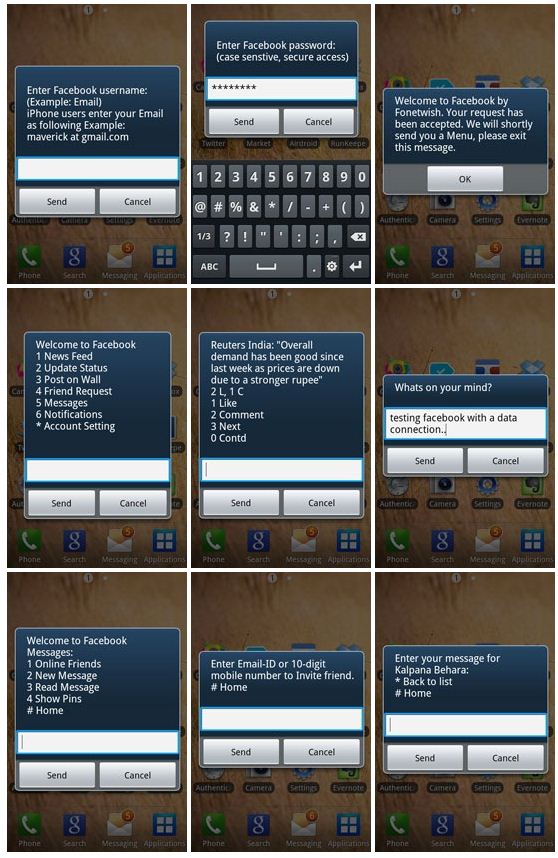
Facebook has become the largest social network on this earth and day to day many people are joining Facebook for connecting with family, friends who are far away from their home. Facebook is becoming the most popular social network for chatting with family and friends, share the knowledge, exposure of any event, talk without any talk, building subscribers for business. If we talk about the registered user by countries then India has become the second largest country in the world whose people are registered with Facebook. Now Facebook has decided to attract more users from India and Facebook India has partnered with Fonetwish by which you can access your Facebook for free without any internet connection without any form of data ( EDGE/WCDMA/HSPA(3G)). You can use your Facebook in the mobile even in Nokia 1100 or no need to have any multimedia mobile or inbuilt any apps. Fonetwish has started this free Facebook access service to Airtel, Idea, Aircel and Tata Docomo users only and may be brings it to other networks. Now here is how to access free Facebook without internet connection in India.


Browse Facebook For Free In India On Mobile Phones


  1. If you are a Airtel/Aircel/Idea or Tata Docomo user, then proceed the below steps and if you are network user then wait for some days to launch this service.
  2. Dial *325# from your mobile phone and wait for a while.
  3. Enter your username and password, now are in your Facebook account.
  4. Choose the number what you want to be, for example if you want to update your status update then choose 2 and go for write and update like the below preview. Take a complete look in the preview,

free facebook access in india
Free Facebook Access Screenshot taken from labnol.org
I personally used this service and have a good experienced without any problem and hope you would also like these feature into your mobile phones. You can also check who are online and chat them and also you could get direct dial number to chat with individual friend, if you are outside of your Facebook account, just you have to dial no. and message them. Using this unlimited service have minor charges, just you have to pay only Rs. 1.00/day and use this feature unlimited.

IF THIS TRICK IS HELPFUL FOR YOU THAN DON'T FORGET TO SUBSCRIBE US FOR MORE UPDATES !
Click On Subscribe Button......!

Unanswered/Pending/Decline Friend Requests|Unfriended Me On Facebook

Your Facebook account popularity is totally depended upon the friends with whom you'd like to share anything and get updates with friend's status, but it hurts, when some of your friends unfriend you and Facebook do not allow you to show which friends have removed you from their friend list. You can not track which friends have removed you, which friends have deactivated their Facebook profile, who has declined your friend request and how much have you pending friend requests. Unfriend finder, a user-script which runs via Greasemonkey for Mozilla Firefox. Unfriend finder allows you to track back door activity of your friends such as who has removed you from their friend list, deactivated their profiles, decline your friend request, awaiting your friend request. So, you can track and take an action in the real time. Unfriend finder uses the Facebook notifications to alert you on these events, or you can see it directly by going to your left sidebar in Facebook's wall and look under the FAVORITES list, after click on Unfriends, you can check all notifications.


How To Check Which Friends Have Removed You in Facebook-Mozilla Firfox


  1. Make sure you are using Mozilla Firefox browser. If not you should install Firefox
  2. If you have installed Greasmonkey on your Firefox, then skip this step otherwise, Install Greasemonkey, after click on Greasemonkey you have to click on +Add to Firefox then you will see a pop up installation add on windows in which you have to click on Install Now button. Make sure to restart your browser otherwise the below step will not work. You can bookmarked this page. After installation of Greasemonkey, you will see an icon Greasemoney for firefox of Greasemonkey onto your browser near URL bar. 
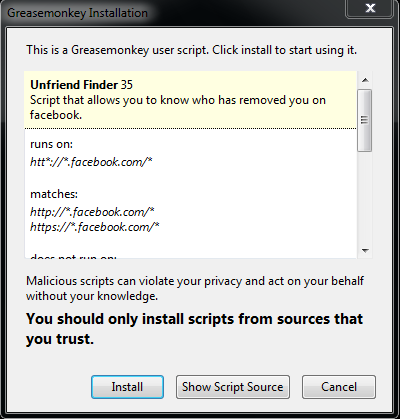
  3. Now install userscript for Unfriends Finder. After clicked, you will see a pop up window like the below preview,

    Unfriend finder in Facebook for Firefox

    now finally click on Install.
  4. Restart your browser, and log into your Facebook account, you will see an additional tab Unfriends onto the top navigation bar near Account, like the below preview,

    Unanswered declined request in Facebook
    clicking on Unfriends, you will see pending requests, and if you wish to cancel all friends request, then you can do it here. You have an option to choose, what do you want to get notified by Unfriend finder, to select various options by clicking on Preferences under Settings under Unfriends tab in FAVORITES list. Take a preview,


when you don't want to use unfriend finder services in your Facebook account, then you can disable it anytime by doing unchecked on Unfreind Finder (see below preview), while you are in Facebook and refresh your Facebook.


disable Unfriend finder in Facebook

Unfriend/Decline/Unanswered You in Facebook - Google Chrome

  1. Make sure you are using the latest version of Google chrome, If not, you should install Google Chrome.
  2. Now install the userscript for Unfriend Finder for Chrome. After clicked, you will see a pop up window like the below preview,

    which have removed you from friend lists

    now finally click on Install
  3. Log into your Facebook account and go back to the 4th step above and read for more information.

    when you don't want to show your photo in the old way on Facebook then simply look at the browser toolbar and go to
    Settings -->Tools -->Extensions and unchecked Enable under Unfriend Finder.

IF THIS TRICK IS HELPFUL FOR YOU THAN
PLEASE DON'T FORGET TO CLICK ON SUBSCRIBE BUTTON...!